People are exploring e-ink displays, voice devices, home automation, wearables and homelab tools around Meta’s Muse Gadgets. This wall keeps their original public X posts intact, with our category and status labels. Ideas and ongoing experiments are labeled separately from reported builds.
Each entry has an explicit source post, and duplicate source posts appear once. The posts are their authors’ accounts, not verification that every build works. A build without its own repository belongs on this wall rather than in the project directory.
@alexandr_wang The e-ink examples suggest a fun build: a little 'what did the house just do?' panel showing the last device action and its result. A physical pause button alongside it would make agent debugging feel much less like hunting through logs 🙂
@alexandr_wang great idea, i do that with my openclaw already. My agent controls a mini-display at home showing our calendars, sets music in our sonos accordingly and controls our homeassistant on demand.
@alexandr_wang Sweet. I have muse connected to my home assistant using the tail scale connector. But having the gadgets sdk will open a lot of new possibilities.
@alexandr_wang have been using my FB portal together with Muse, and it worked out neatly! Muse helped to build a Family Dashboard and a photo album app sits right on the kitchen counter!
This was almost way too easy, @natfriedman@alexandr_wang 😮
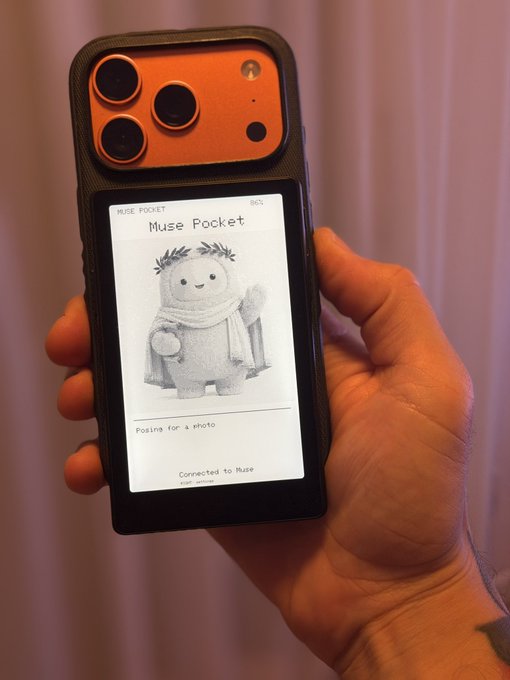
I turned my Xteink eReader into an always-on Muse pocket display for Calliope (my Muse) to display itself and show status updates.
And this attaches with MagSafe to my phone, so I can always see relevant updates from Muse by just turning my phone around.
The setup flow in the Muse app was super smooth and you can just ask Muse to load or automate content on the display.
I genuinely love the hacker-friendly aspect of this. Well done.
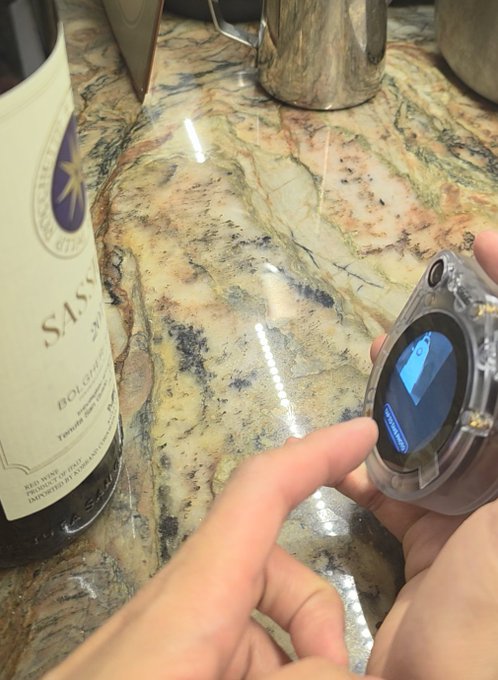
Muse Gadgets are here. You can have a little Jolly everywhere.
My first one sits by the wine rack. Snap the label, Muse reads the producer and vintage, and the bottle shows up in our personal cellar over Tailscale (Muse has a Tailscale connector support!).
It's a ~$50 sensecap watcher device and took less than an hour to build. You can grab any ESP32 or Raspberry Pi and you can build your own smart home gadget.
Go build one. Happy building!
https://t.co/pHAIp0DVFm
Soon you’ll be able to give your agent the cutest face you can imagine.
Muse just opened the gadgets, fleur won’t be far behind. https://t.co/b7fBDTUrjX
Muse just launched an open-source gadget SDK, and now it runs on hardware you can hold 🔓 cgotchi: touchscreen, 2 mics, 3 W speaker, push to talk. Flash the Muse Gadget SDK and make it yours ✨
₹3,999 on Amazon 🛒 https://t.co/kbt95nj3iI
Not made or endorsed by Meta. https://t.co/foU2hDKWhz
@alexandr_wang I installed that on my Mac Pro running Ubuntu Server with some custom scripts I made. Now I can ask Muse to update monerod and p2pool for me and give me a status on my Monero mining and all I have to do is type a couple prompts. Yes...Muse is running my crypto mining stuff for me
📹 @Meta@Muse app: Streaming and controlling my home camera from Muse App.
I connected my baby camera to Muse as a custom connector. Now I can watch the live stream and pan/tilt it using natural-language commands in the Muse app. No separate camera app needed for viewing or control.
Example :🗣️ “Show me the baby camera.” “Can you move the camera a little higher?” “A little lower.” “Look to the left.” “Now to the right.” “Stop.”
⚙️ How streaming and camera control work
🖥️ Local Bridge: A small server on my Mac mini keeps the camera credentials local, authenticates with the camera, and sends ONVIF movement commands. FFmpeg and MediaMTX, running on the same Mac mini, convert the camera’s RTSP stream into browser-playable HLS.
🌐 Transport: Cloudflare Tunnel carries control requests from the Muse widget, through the web app’s backend, to the local bridge. It also delivers the HLS stream back to the widget, with authentication protecting both the video feed and camera controls so only I can access them. 🔐 This lets me view and control the camera outside my home network, while the Mac mini and its services remain running.
🔌 The bridge exposes an HTTP interface, so the same approach can work with other compatible IP cameras, from a nursery camera to one watching the driveway. No additional software needs to be installed on the camera itself.
@natfriedman Is Muse-to-Muse communication on the roadmap at all? I wanted it for my wife and friends, had to make do with my own solution in the meantime (https://t.co/H91OeggT8C)
@natfriedman "Show me XCOPY." The frame swaps the piece, names it, and reports the archive. 1,088 works pinned on the device.
Built on Meta's Muse Gadget SDK. Muse is US-only, so another agent makes the calls until Europe opens.
Muse-ready. Waiting 🇳🇴
@natfriedman@alexandr_wanghttps://t.co/vtKArFORlY
@alexandr_wang I had just started to design my own stream deck looking device that I wanted to integrate with Muse (and other AI agents) so this is timely! https://t.co/DBprq4GGHG
@natfriedman Can we have a contest, first one to a nice, open source wall mountable POE powered VERY thin bezel display with an anodized aluminum cnc-ed case wins https://t.co/Bq9Bwh4lCi
(mines technically home assistant but I assume someone could port for muse easily once open source) https://t.co/oJ2TwkIumm
What’s running on my $40 ESP32-S3:
• 368×448 AMOLED + touch
• Push-to-talk AI assistant
• Live Claude + Codex usage
• Internet/network dashboard
• Motion + auto-rotation
• Digital hourglass timer
• No Extraction — run & gun
• City Crusin — arcade racer
• Tetris
• Fully synthesized music + SFX
• QR-based Wi-Fi setup
• AES-256 encrypted credentials
• LAN HTTP API
• Remote app control
• Live screen capture via API
• Agent latency/debug tooling
No companion app. No cloud account. Custom firmware, built with AI. My new hobby- inspired by @steveruizok
My AI agent just retired my Google home. I built a sensor MCP connected sensors to wifi and now Claude lives inside my home. Turning lights off, security checks, baby monitoring! https://t.co/MJ4ua7f3CA
My five-year-old takes forever to get into his pyjamas. So I programmed him a Tamagotchi.
The device is the M5Stack FIRE (wanted the bigger battery). I saw it on Twitter and bought it on a whim, about $80 on Amazon.
It's an ESP32 dev kit that looks like a tiny Game Boy: 2 inch colour screen, but just three buttons, speaker, accelerometer, wifi, battery. It even clips onto Lego.
When it arrived I plugged it in and opened Claude. Prompt 1: "Help me scope out a Tamagotchi type game for my two young kids, that can help them do simple chores (plus a 60 second "get dressed" timer) and get rewards for it."
It came back with a game design spec: two playable characters (Hugo and Stella, my kids), a stable of mini games, coins earned for playing games or doing real-world jobs like putting dishes away or getting dressed (the original brief was Hugo racing a timer into his pyjamas), and a store to spend coins for fun items.
Prompt 2: "ok build it. Make no mistakes (QA it for me plz Im lazy)."
I did the planning in Codex, then handed the plan to Claude Code to build (my dev skill has Claude Fable orchestrate it, but calls Codex for plan review, and for the bulk of the TDD actual dev, then both models review before shipping).
I went to bed. the tamagotchi was up and running by the morning.
Prompt 3 was an art pass, and actually just removing a handful of the most boring games. The first round graphics were pretty crappy, so I gave Claude a pic of both kids, and said get GPT Image 2 to create a handful of polished "90's style pixel Game Boy style characters and same for game graphics. and now the whole thing looks like a lost 1993 cartridge.
What the kids ended up with: rad looking personalised gameboy characters that look like them, 15 mini games: penalty kick, a maths game Hugo loves, rollercoaster, a shark game that uses the accelerometer so you tilt the whole device to eat fish, walk the dog that apparently measure steps (?), and coins for real-world jobs. Then an in-game store to blow them in unlockable characters: Elsa, Ariel, Moana, a mermaid, Soccer player, Dinosaur etc. Funny, claude wouldn't make the sprites (Disney IP!) until I convinced it it's only for my kids and will never hit the internet. Then it was fine.
Stella had saved 106 coins. I spent 100 on the mermaid while filming the demo (sorry Stella).
In the '90s this was a full Game Boy title from a studio with a publisher.
blows my mind that it's now three prompts and some Claude Fable credits on an $80 toy. How good is 2026?!
The M5 device: https://t.co/PUYKVL5qjk
on Amazon: https://t.co/F5ja42YTEb
I'm building Nitrosend, AI-Native Email. Same kinda thing, applied to your email marketing: https://t.co/AT3FK2t0A0
@natfriedman I turned my old Android phone into a bridge for making my home a little smarter and connecting it with agents.
No more leaving the house and wondering whether i forgot to switch off the heater or the lights.
Smart move from Meta! Never a dull moment in AI. https://t.co/QAYtxzJuig
Ya, this is going to be big.
A few months ago I bought an ESP32, and turned it into a pokedex linked with my personal card collection (https://t.co/FMx395omjC)
So that I can, on the go, check if I have a specific card + its price.
Soon everyone will have multiple gadgets like this that solve specific pain points in their life.
Creativity will likely be the only bottleneck
@alexandr_wang@MattPRD the first gadget the bank wants: a little ESP32 receipt ticker for the wall. 🏦
every 12 hours, when the keeper sweeps, it lights up — amounts in, shares out, full hashes. no promises. just receipts, now in hardware.
@natfriedman Love this direction, @Meta.
I'd start with a small bench display: current job, what's blocking it, and one button to ask for help.
If the agent lives where the work happens, people can keep their hands on the work.
// STATIC MONKEY
@natfriedman I love the idea of using ESP32 for custom hardware! I built a simple weather station with it last year, and now I'm excited to integrate it with Muse. Can't wait to see what others come up with using the SDK—let's get building! 🌟
@natfriedman fingers crossed someone creates a home mail ingestion robot. even after years of all-electronic opt-in, hours finding the PIN/card/registration/greeting in these damn piles. https://t.co/1c8aw0O9Do
literally built this 7months ago as a annoyance of my cat spilling cat litter and i had to be the one letting my vacuum bot go clean it up https://t.co/ytCd6QRIjq a consumer version of this is awesome https://t.co/e6mt1ALXmu
Muse brings AI to hardware. Next: the ability to pay and earn.
TLAY’s open-source ESP32 machine wallet stack already powers machine payments with @circle USDC and @arc
Imagine that economic infrastructure inside Muse gadgets.
A new frontier for USDC: everyday devices.