Official SDK
Forked from facebookincubator/muse-gadget-sdk. The saved root README has the same Git blob SHA as upstream. The census records commits ahead of upstream, which alone do not establish a distinct feature or working hardware integration.
Unofficial community directory · not affiliated with MetaUnofficial · not affiliated with Meta
About this sitevocino/muse-gadget-sdk
Short answer
The inherited README describes ESP32 boards and Raspberry Pi or other Linux machines. Pairing uses Developer mode in the Muse app and a personal SDK token. These are upstream requirements described in the fork’s README.
The inherited README directs ESP32 and Linux builders to the respective esp32/ and linux/ documentation. Use those repository-specific entry points for the build path; the root README supplies no separate fork build procedure.
Forked from facebookincubator/muse-gadget-sdk. The saved root README has the same Git blob SHA as upstream. The census records commits ahead of upstream, which alone do not establish a distinct feature or working hardware integration.
Apache-2.0 with the third-party exceptions described in the inherited license section. Jollybot avatar artwork is excluded from that license; preserve the upstream copyright and applicable notices.
Last pushed 3 Oct 2026, with 0 stars and 0 forks. This is repository activity metadata, not a build or device validation.
Source: GitHub README
Written by the project’s authors, not by Muse Gadgets Hub. Shown with the images and links the authors published, under the project’s Apache-2.0 license.
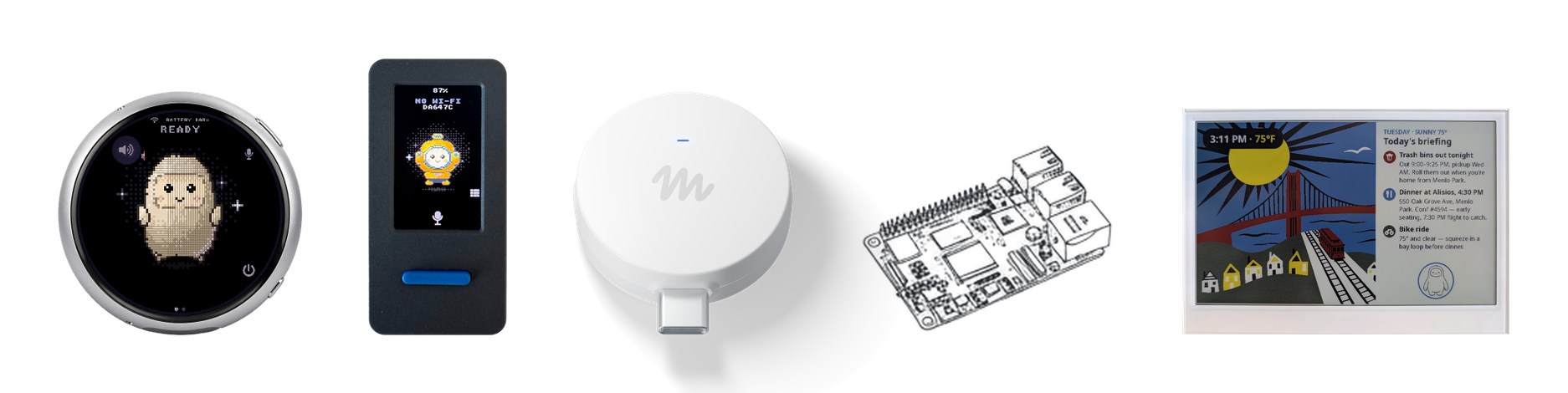
Muse gadgets are open source devices you build yourself. Program an off-the-shelf ESP32 board or set up a Raspberry Pi with our device SDKs, then connect Muse to your displays, buttons, sensors, actuators, and whatever else you've got lying on your workbench.
We open sourced the SDKs and firmware here. It's built by hackers, for hackers, just for fun. Side effects of tinkering may include bricked boards, voided warranties, brownouts, or bankruptcies. Proceed at your own risk!
| ESP32 Device SDK | Connect your ESP32 board to Muse through our open source SDK. Throw in a screen to show images, add audio in and out, or wire up other sensors. |
| Linux Device SDK | Turn that spare Raspberry Pi or Linux box into a Muse gadget. Hack in your own commands to let Muse handle sysadmin chores or your Home Assistant setup. |
Before you flash or pair a gadget, get an SDK token and review the Gadget SDK Terms. Every gadget needs a token to pair.
ESP32 and Linux gadgets pair with the Muse app on iOS and Android, via
Settings > Devices. Turn on Developer mode there first, then look for devices
prefixed with "MuseGadget".
Each directory has a README.md to get started and an AGENTS.md for coding
agents like Muse Code.
Meet other hackers who are building and customizing Muse gadgets in our community Discord. Get inspired, support each other, and share what you make.
Muse Gadgets is licensed under the Apache License, Version 2.0, found in
LICENSE, except for these third-party files, which keep their
upstream licenses:
| Path | Upstream | License |
|---|---|---|
esp32/components/minimp3/include/minimp3.h |
lieff/minimp3 | CC0-1.0, see LICENSE |
esp32/main/pixel_font.c |
Adafruit GFX glcdfont.c |
BSD-2-Clause, in the file header |
Dependencies fetched at build time are under their own licenses: ESP-IDF
components (into esp32/managed_components/), and the simulator's LVGL and
SDL (listed in esp32/simulator/THIRD_PARTY.md).
The Apache License does not cover the Jollybot avatar.

msanchezgrice/hackshop-mcp
Hardware-literate AI scout for tinkerers. Idea-to-hardware mapping via MCP.
cameronapak/muse-r1
Native Android HOME app that turns a Rabbit r1 running LineageOS into a Muse gadget.